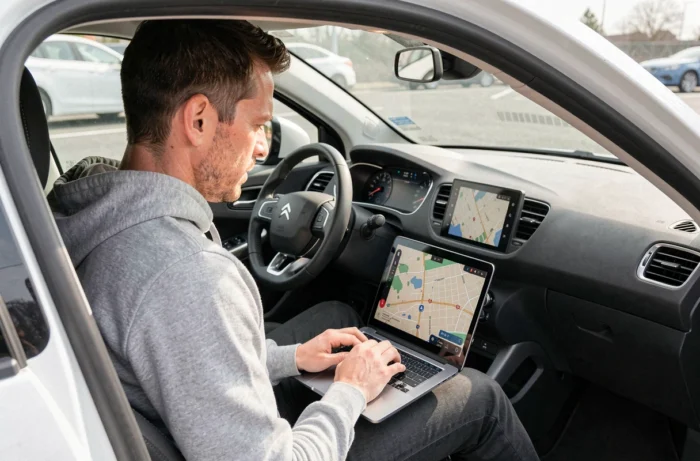
The GPS update for a Citroën C4 does not follow a single procedure. Depending on the vehicle generation and the embedded multimedia system, the steps, media, and files differ. A compatibility error or a poorly prepared file can block the installation or even freeze the navigation screen. Before plugging in a USB drive or starting a download, a few targeted checks can prevent most failures reported by users.
1. Precisely identify the multimedia system before any manipulation
The name “C4” covers several generations and equipment. A 2015 C4 does not have the same system as a 2022 C4. Launching an update intended for a different system can cause total incompatibility, without an explicit error message.
The reliable starting point remains the vehicle VIN number. By entering it on the official Citroën portal, you obtain the exact reference of the installed multimedia system and the updates available for your configuration. Do not rely solely on the model or year: two C4s from the same year may have different equipment depending on the trim chosen at purchase.
Some recent C4s equipped with connected services receive map updates directly through the vehicle connection, without using a USB drive. A guide for the Citroën C4 GPS update details common mistakes related to this confusion between manual and connected procedures. Check what your system supports before preparing anything.
2. Prepare the USB drive according to the technical requirements of the system
The majority of GPS updates on Citroën C4s require a USB drive formatted in FAT32. This formatting is not optional: a drive in NTFS or exFAT will simply not be read by the multimedia system, even if the files it contains are correct.
Several constraints add to the formatting:
- The capacity of the drive must be sufficient to hold all the map files, which can weigh several gigabytes depending on the geographical area covered
- The files must be copied to the root of the drive, without any manually created subfolder, unless the download portal itself structures the hierarchy
- The download must be complete before removing the drive from the computer; an interrupted transfer produces corrupted files that the system will silently reject
Preferably use a computer connected via a wired connection or on a stable network. An interrupted download that is then resumed does not guarantee the integrity of the final file.
3. Do not confuse map updates with GPS reception failure
A GPS that displays missing roads or inconsistent routes needs a map update. A GPS that regularly loses the vehicle’s position or takes several minutes to locate itself is a different problem.
Satellite reception and mapping are two distinct layers. Updating the maps will never correct a GPS antenna defect or a hardware malfunction of the location module. Before investing time in an update, check if the problem persists in an open area, away from tall buildings or tunnels.
If the signal loss is recurrent in all conditions, a visit to a workshop for diagnosis is necessary. Some forums report cases where installing an update on a system with a faulty GPS module froze the multimedia screen, requiring a complete reset.
4. Follow the installation sequence without interrupting the process
Once the USB drive is inserted and the update is started, the vehicle’s engine must remain running for the entire duration of the operation. A power cut during installation can corrupt the navigation system, or even require dealership intervention to restore the firmware.
The installation duration varies depending on the volume of map data. It can take from a few minutes to over an hour for a complete update covering all of Europe. During this time:
- Do not remove the USB drive, even if the screen seems inactive or temporarily frozen
- Avoid using other functions of the multimedia system (radio, phone, settings) that could interfere with the process
- Never turn off the ignition before the screen explicitly shows the end of the installation
On some systems, an automatic restart of the multimedia screen indicates the end of the process. If the screen does not respond after a prolonged period, consult the vehicle documentation before forcing a restart.
5. Evaluate the alternative of navigation via smartphone
C4s compatible with Apple CarPlay or Android Auto offer an option that is worth considering before embarking on a paid map update. Smartphone navigation apps (Google Maps, Waze, Apple Maps) have continuously updated maps, without manual intervention.
This alternative does not completely replace the built-in GPS in all cases. The native display on the vehicle’s screen remains more readable on some systems, and the integrated navigation works without relying on mobile network coverage. In rural areas or abroad, an embedded GPS with recent mapping has an advantage over a smartphone whose data connection may be limited or costly.
The choice between updating the built-in GPS and smartphone navigation thus depends on your usage. For primarily urban or suburban trips with good network coverage, the smartphone may suffice without additional costs. For regular travel in low coverage areas, embedded mapping remains the most reliable solution.
The success of a GPS update on a Citroën C4 relies less on the manipulation itself than on the preparation beforehand. Identifying the correct system, properly formatting the media, distinguishing a software issue from a hardware defect: these checks take a few minutes and save hours of troubleshooting.